Nilesat is one of the most important communication satellites in the Middle East and North Africa (MENA) region. Since its launch in 1998, it has become the backbone of satellite broadcasting in the region, offering a wide range of services including television, radio, and internet. Known for its extensive coverage and reliability, Nilesat plays a crucial role in connecting millions of viewers, businesses, and institutions across the Arab world.
🚀 On the subject of Nilesat
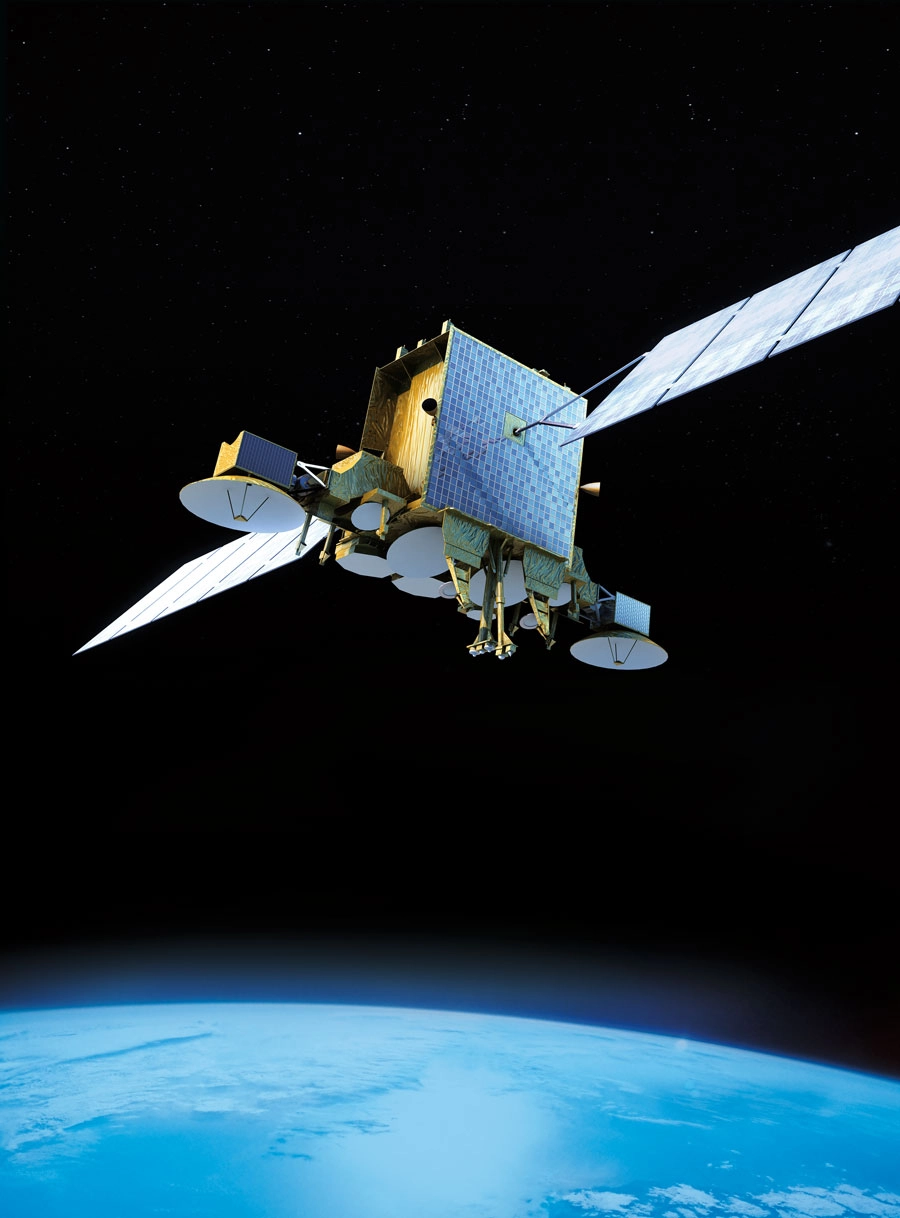
Nilesat, operated by the Egyptian company Nilesat Satellite Communications, provides satellite broadcasting services to a wide range of customers across the Middle East, North Africa, and parts of Europe. The satellite allows for the transmission of television and radio signals, as well as data and internet services.
Nilesat’s fleet of satellites serves multiple purposes:
-
Broadcasting TV channels: Free-to-air and subscription-based channels.
-
Radio broadcasting: National and regional radio stations.
-
Data services: Internet access and other telecommunication services.
-
Corporate communications: For businesses and institutions requiring dedicated communication lines.
With several satellites in orbit, including Nilesat 101, Nilesat 102, and the more recent Nilesat 201, the network continues to grow in capacity and service offerings.
🌐 Nilesat’s Satellite Fleet
Nilesat operates a fleet of geostationary satellites positioned to serve the MENA region and beyond. These satellites are carefully positioned to provide the best possible signal coverage. Key satellites in the fleet include:
-
Nilesat 101
-
Nilesat 102
-
Nilesat 201
-
Nilesat 301 (upcoming)
These satellites are strategically placed to ensure seamless coverage for broadcasting TV channels, radio stations, and other telecommunication services.
🛰️ Frequencies and Services on Nilesat
Nilesat operates across various frequency bands, including the C-band and Ku-band. These frequencies are used for various services:
-
C-band: Primarily used for long-range communication and broadcasting, C-band offers a stable signal with less interference from weather conditions. It’s commonly used for television broadcasting.
-
Ku-band: This band is widely used for satellite TV broadcasting and internet services. The Ku-band offers higher capacity and smaller antennas, making it ideal for both residential and commercial use.
Nilesat also provides a variety of frequency ranges that enable users to access a broad array of channels and services. Users looking to set up satellite systems can find detailed guides to help them tune in to the correct frequencies.
📡 How to Receive Nilesat Signals
To access Nilesat’s satellite signals, users need a satellite dish and a receiver that supports the appropriate frequency bands (C-band or Ku-band).
The dish must be correctly aligned with the satellite’s orbital position for optimal signal reception. Once the dish is set up, users can enter the corresponding frequency in their receiver to access the desired channels.
Common Nilesat Frequencies:
-
Nilesat 101/102 Frequency:
-
Frequency: 11.977 GHz (Vertical)
-
Symbol Rate: 27500
-
FEC: 3/4
-
-
Nilesat 201 Frequency:
-
Frequency: 12.515 GHz (Horizontal)
-
Symbol Rate: 27500
-
FEC: 3/4
-
Users can access various TV channels, radio stations, and data services on these frequencies.
For easy access to these frequencies and satellite configurations, FreqSatellite is a reliable platform offering up-to-date information on Nilesat’s channels, frequencies, and settings.
Nilesat remains a vital asset for satellite communications and broadcasting in the Arab world.
With its broad coverage, extensive services, and reliable signal quality, it is a key player in delivering television, radio, and internet services to millions of people in the MENA region.
Whether you’re looking to set up a satellite system for personal or commercial use, Nilesat continues to provide top-notch services. For more information on frequencies and satellite settings, FreqSatellite offers the most comprehensive and current satellite guides.
Reasons for Slow Channel Scanning
Slow scanning can frustrate users and delay setup. Identifying causes helps speed up the process.
1. Weak or Fluctuating Signal
- Low signal strength prolongs scanning as the receiver struggles to lock onto channels.
2. Receiver Performance
- Older or low-performance receivers may scan more slowly.
3. Number of Transponders
- Satellites with many transponders take longer to scan, especially if network scan is used.
Best Tilt Angle for Your Satellite Dish Based on Location
The correct LNB skew angle improves signal quality and reduces interference. Adjust based on geographic coordinates.
1. Determine Latitude
- Your local latitude affects the ideal dish tilt angle.
2. Calculate Skew
- Use online calculators or satellite maps to find recommended LNB rotation.
3. Fine-Tune While Monitoring Signal
- Adjust slightly while observing signal strength for maximum reception.
Steps to Inspect the Entire System When All Channels Are Lost
Losing all channels usually indicates major issues. A full system check helps identify and resolve the root cause.
1. Verify Dish Alignment
- Ensure the dish is correctly pointed at the satellite.
2. Check LNB and Cables
- Inspect LNB for faults and cables for continuity or damage.
3. Receiver Settings
- Ensure the receiver is configured correctly for the satellite and frequencies.
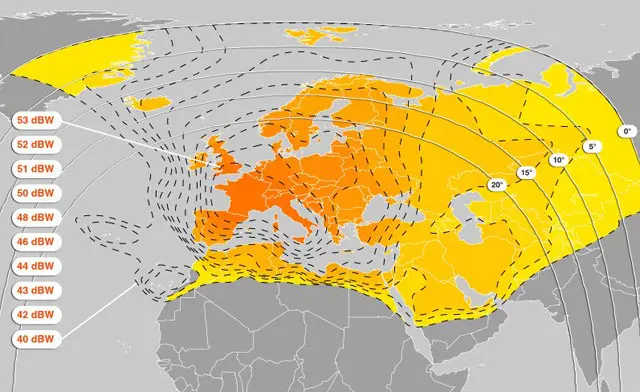
How to Read a Satellite Coverage Map
Satellite maps show areas of strong and weak signals. Understanding them helps in dish placement and size selection.
1. Identify the Beam Type
- Spot beams target specific regions; wide beams cover large areas.
2. Check Signal Strength Zones
- Maps often use colors or contours to indicate signal intensity.
3. Plan Dish Size Accordingly
- Stronger areas allow smaller dishes; weaker zones may need larger dishes.
How to Prevent Water Ingress in Coaxial Cables
Water entering the coaxial cable causes signal loss, corrosion, and long-term damage. Proper protection is essential.
1. Use Weatherproof Connectors
- Seal F-connectors with rubber boots or self-amalgamating tape.
2. Ensure Proper Cable Routing
- Route cables downward or with drip loops to prevent water pooling near connectors.
3. Inspect Regularly
- Check outdoor connections periodically for cracks, corrosion, or water ingress.
Steps to Test an LNB Using Another Receiver
Testing your LNB with a second receiver helps determine whether signal issues come from the LNB or the main receiver.
1. Disconnect the Current Receiver
- Safely disconnect the coaxial cable from your main receiver.
2. Connect to a Known Working Receiver
- Attach the cable to another receiver that is confirmed to be functioning properly.
3. Check Signal Quality
- If the signal improves, the original receiver may be faulty.
- If the signal remains weak, the LNB or dish alignment may need attention.
Causes of Weak Satellite Signals and How to Solve Them
Weak satellite signals can disrupt your viewing experience. Identifying the causes helps restore stable reception.
1. Dish Misalignment
- Even a slight deviation from the correct satellite position can weaken the signal.
2. Poor Quality Cables or Connectors
- Check for corrosion, loose connections, or damaged coaxial cables.
3. LNB Issues
- Replace old or low-gain LNBs to improve signal quality.
4. Environmental Obstacles
- Tall trees, buildings, or other structures can block or reflect signals.
Difference Between SD and HD Broadcasts in Signal Usage
Standard Definition (SD) and High Definition (HD) broadcasts require different bandwidths and signal strength. Understanding this helps optimize reception.
1. SD Channels
- Require lower bandwidth and are less demanding on signal quality.
- Easier to receive in weak signal areas.
2. HD Channels
- Consume more bandwidth and need stronger, stable signals for clear picture.
- Prone to interruptions if signal fluctuates.





I successfully added missing channels thanks to your guide.
Thanks for the clear frequency tables. Very easy to tune channels.
Thanks for the clear frequency tables. Very easy to tune channels.
Your website makes it very easy to follow new satellite changes.
Very helpful explanations about polarization and symbol rate.
Great resource for satellite TV frequency news.
Very helpful explanations about polarization and symbol rate.
I successfully added missing channels thanks to your guide.
Excellent coverage of new satellite channel launches.
Accurate and updated satellite information every time.
The step-by-step tuning guide helped me a lot. Very clear instructions.
Your updates on new channel launches are always fast and accurate.
I always visit your site before doing a manual channel search.
Thanks for the quick updates about frequency changes.
Thanks for the clear frequency tables. Very easy to tune channels.
Thanks for the quick updates about frequency changes.
Very accurate satellite frequency updates. I tuned all channels without any issues.
Your updates on new channel launches are always fast and accurate.
Very reliable source for Nilesat and Hotbird frequencies.
Your frequency lists are well organized and simple to follow.
I always visit your site before doing a manual channel search.
Your updates on new channel launches are always fast and accurate.
Excellent coverage of new satellite channel launches.
Very accurate satellite frequency updates. I tuned all channels without any issues.
Accurate and updated satellite information every time.
The step-by-step tuning guide helped me a lot. Very clear instructions.
I successfully restored my favorite channels using your guide.
Accurate updates for HD channels across multiple satellites.
Reliable source for checking Nilesat frequency updates anytime.
Great resource for satellite TV frequency news.
Accurate and updated satellite information every time.
Your frequency tables are clean and easy to understand.
Your site saved me time when searching for missing channels.
Accurate updates for HD channels across multiple satellites.
Great job updating HD and SD channel frequencies so quickly.
Very helpful explanations about polarization and symbol rate.
Accurate and updated satellite information every time.
Reliable source for checking Nilesat frequency updates anytime.
Very helpful explanations about polarization and symbol rate.
Your updates on new channel launches are always fast and accurate.
Thanks for the quick updates about frequency changes.
Great resource for satellite TV frequency news.