SuhailSat is Qatar’s flagship satellite, offering high-quality broadcasting and communication services across the Middle East, North Africa, and parts of Europe. Operated by Es’hailSat, the company founded in Doha, SuhailSat represents a major step in Qatar’s ambitions to become a leader in space technology and satellite broadcasting.
Launched to provide secure, reliable, and high-performance satellite services, SuhailSat supports television channels, broadband internet, and secure communications for both governmental and commercial clients.
🚀 On the subject of SuhailSat
The name SuhailSat is inspired by the Arabic name for the Canopus star (Suhail), one of the brightest stars in the sky, symbolizing clarity and excellence.
Currently, the SuhailSat program includes:
-
Es’hail-1 (launched in 2013)
-
Es’hail-2 (launched in 2018)
Both satellites are stationed at 25.5°/26.0° East orbital positions, which makes them ideal for coverage across the MENA region and parts of Europe.
🛰️ SuhailSat Features and Services
SuhailSat offers a wide range of services, including:
-
HD and 4K TV broadcasting: Delivering premium quality video services.
-
Secure communications: Especially important for governmental and military operations.
-
Broadband and internet services: Supporting businesses and ISPs across the region.
-
Media transmission: Used extensively by major TV networks for reliable and clear signals.
Notably, Al Jazeera Media Network and beIN Sports use SuhailSat for their broadcasting services.
📡 How to Receive SuhailSat Signals
Receiving SuhailSat channels is easy if you have the proper satellite dish setup aligned towards the 25.5°/26.0° East orbital slot.
Common Reception Requirements:
-
Satellite Dish Size: 90 cm to 120 cm (depending on your region)
-
LNB: High-quality Universal LNB
-
Receiver: Compatible with DVB-S2, HD, or UHD standards
Example Frequencies:
-
11270 V 27500 2/3 (HD channels)
-
11642 H 27500 2/3 (News and entertainment)
For updated frequencies and detailed setup instructions, FreqSatellite provides the most accurate and latest satellite information.
🌐 SuhailSat Coverage
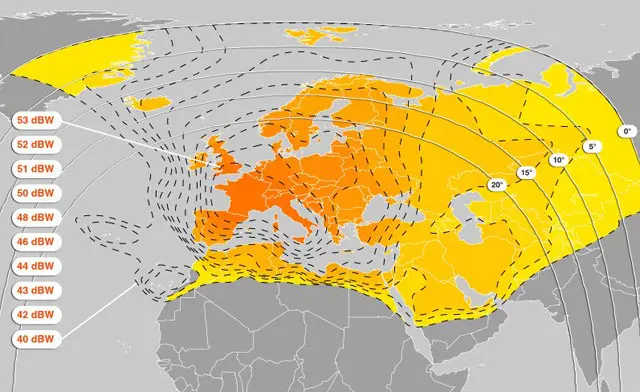
SuhailSat offers excellent coverage over:
-
Qatar
-
Arabian Gulf countries
-
North Africa
-
Levant region
-
Parts of Europe
Its powerful beams ensure a reliable and strong signal quality, even in remote areas.
SuhailSat stands as a symbol of technological innovation in Qatar, providing secure and high-quality satellite services to millions of viewers and businesses. Whether you’re tuning into your favorite TV channels, setting up broadband satellite internet, or managing secure communications, SuhailSat offers a reliable solution.
For full frequency lists, satellite settings, and the latest updates, visit FreqSatellite — your ultimate guide for satellite technology
How to Adjust LNB Power Settings
Proper LNB power ensures stable reception and prevents damage. Adjusting voltage and polarization settings is key.
1. Check LNB Voltage Requirements
- Most LNBs require 13V/18V for vertical/horizontal polarization.
- Use the receiver settings to match the LNB specification.
2. Configure 22kHz Tone if Needed
- Some LNBs require a 22kHz tone for switching bands or multiple outputs.
3. Test Signal Quality
- After adjusting, verify signal strength and quality on the receiver.
How to Accurately Adjust a Motorized Dish
Motorized dishes allow access to multiple satellites. Proper alignment ensures maximum signal quality and channel stability.
1. Set Initial Position
- Align the dish to the first satellite using a fixed reference or compass.
2. Fine-Tune with Receiver
- Use the receiver’s signal meter to adjust azimuth and elevation until quality peaks.
3. Program Satellite Positions
- Store satellite positions in the motor controller for easy switching.
- Check each satellite individually to confirm optimal reception.
Impact of Weather on Satellite Reception and How to Overcome It
Weather conditions like rain, snow, and storms can reduce signal quality. Preparing your system helps minimize disruptions.
1. Rain Fade
- Heavy rain can weaken Ku-Band signals; consider larger dishes or low-noise LNBs.
2. Snow and Ice
- Clear snow from dish surface to maintain reception.
3. Wind Effects
- Ensure the dish is mounted on a strong, stable bracket to prevent movement.
Impact of Atmospheric Pressure on Broadcast Signals
Atmospheric conditions, including pressure, humidity, and temperature, affect satellite signal propagation and reception quality.
1. Signal Attenuation
- Low pressure and high humidity can slightly weaken signals, especially at higher frequencies.
2. Temporary Interference
- Rapid changes in atmospheric pressure may cause minor disruptions in signal stability.
3. Mitigation
- Use a high-gain LNB and properly sized dish to minimize atmospheric effects.
How to Adjust LNB Power Settings
Proper LNB power ensures stable reception and prevents damage. Adjusting voltage and polarization settings is key.
1. Check LNB Voltage Requirements
- Most LNBs require 13V/18V for vertical/horizontal polarization.
- Use the receiver settings to match the LNB specification.
2. Configure 22kHz Tone if Needed
- Some LNBs require a 22kHz tone for switching bands or multiple outputs.
3. Test Signal Quality
- After adjusting, verify signal strength and quality on the receiver.
Difference Between Single and Centralized Reception
Choosing between a single receiver and a centralized distribution system affects convenience, cost, and signal quality.
1. Single (Individual) Reception
- Each receiver connects directly to the dish and LNB.
- Simple setup, suitable for one or two TVs.
2. Centralized Reception
- One dish feeds multiple receivers via multiswitches or splitters.
- Reduces equipment duplication and simplifies long-term management.
Steps to Accurately Adjust the Dish for Maximum Signal Quality
Achieving peak signal requires careful adjustments of elevation, azimuth, and skew.
1. Set Approximate Elevation
- Start with the elevation angle from satellite coordinates.
2. Adjust Azimuth Slowly
- Rotate dish left or right to find the strongest signal peak.
3. Fine-Tune Skew and LNB
- Rotate the LNB slightly to maximize signal quality and reduce errors.
Importance of Using a Protective Lens for the LNB
A protective cap shields the LNB from dust, rain, snow, and UV exposure, prolonging its lifespan and maintaining signal quality.
1. Weather Protection
- Prevents water infiltration and corrosion in rainy or snowy conditions.
2. Dust and Debris Prevention
- Stops dust, leaves, and small particles from affecting the LNB’s surface.
3. Prolongs LNB Lifespan
- Reduces maintenance needs and ensures stable performance over time.


Very helpful explanations about polarization and symbol rate.
I successfully restored my favorite channels using your guide.
Great job updating HD and SD channel frequencies so quickly.
Accurate updates for HD channels across multiple satellites.
Accurate updates for HD channels across multiple satellites.
Your frequency tables are clean and easy to understand.
Very reliable source for Nilesat and Hotbird frequencies.
Thanks for the quick updates about frequency changes.
Your updates on new channel launches are always fast and accurate.
Thanks for sharing the latest transponder details. Everything worked perfectly.
Thanks for the clear frequency tables. Very easy to tune channels.
Thanks for the clear frequency tables. Very easy to tune channels.
I successfully added missing channels thanks to your guide.
Very helpful explanations about polarization and symbol rate.
Thanks for the clear frequency tables. Very easy to tune channels.
The step-by-step tuning guide helped me a lot. Very clear instructions.
Thanks for sharing the latest transponder details. Everything worked perfectly.
Reliable source for checking Nilesat frequency updates anytime.
The step-by-step tuning guide helped me a lot. Very clear instructions.
Great satellite frequency updates. Everything works perfectly every time.
Thanks for the quick updates about frequency changes.
Reliable source for checking Nilesat frequency updates anytime.
Your frequency tables are clean and easy to understand.
Thanks for the quick updates about frequency changes.
I successfully added missing channels thanks to your guide.